How Often Should You Run Your Robotic Pool Cleaner?
The first week I owned a robot, I ran it every single day. I thought more was better. It isn't, but getting the frequency right matters more than most people realize.
Run your robot 2-3 times per week during swim season. Daily during heavy use periods or fall leaf drop. Weekly or bi-weekly off-season. The right frequency is the one that keeps your pool floor clean between runs - if you're seeing debris sitting for days, run it more often.
Frequency by Pool Situation
I track how dirty my pool floor looks 24 hours after a cleaning cycle. That feedback loop is more useful than any fixed schedule. Here's what I've found works by situation:
| Your Pool Situation | Recommended Frequency | Why |
|---|---|---|
| Light use, no trees, covered when not swimming | 2x per week | Minimal debris load |
| Average use, occasional leaf debris | 3x per week (standard) | Covers 90% of pools |
| Kids/parties, heavy swimmer load | Daily or after each event | Sunscreen, oils, heavy debris |
| Trees nearby, heavy leaf drop (fall) | Daily | Leaves stain floors quickly |
| Saltwater pool in hot climate | 3-4x per week | Algae grows faster in heat |
| Off-season, pool still open | Weekly or bi-weekly | Less use, slower debris |
What Happens When You Under-Run It
Skipping runs lets biofilm build up on the floor and walls. Biofilm is the slippery film that forms before visible algae appears. Once it takes hold, your robot has to work significantly harder to scrub it off, and it strains the motor more each cycle.
In practice: a pool I under-ran for two weeks in August came back with a visible green tint at the waterline and a floor that took three consecutive daily cycles to get clean again. Consistent runs are genuinely easier on the machine than sporadic deep cleans.
If your pool goes more than 5-6 days without a robot cycle in swim season, you're inviting algae. Even light debris sitting on a warm floor creates the conditions for a green pool. Your robot is the prevention tool - use it as one.
Can You Run It Too Often?
Daily running is fine for any quality robot. The drive motors are built for regular use. The real risk of over-running isn't wear on the motor - it's these three things:
UV degrades the housing and seals when the robot sits in water for hours post-cycle. Pull it out when the cycle ends and let it dry in the shade.
High chlorine concentrations during shock (above 5 ppm) degrade rubber seals and tracks. Always wait 24 hours after shocking before running your robot.
A dirty filter forces the motor to work harder. If you're running daily, rinse the filter every single time - not just once a week.
By Season: What I Actually Do
Run daily for the first 2 weeks after opening. The pool floor accumulates months of debris under covers. Get it clean first, then drop to a maintenance schedule.
3x per week minimum. After parties or heavy swim days, run the next morning. I use my robot's scheduler set to Monday, Wednesday, Friday and adjust manually around events.
Daily, no exceptions. Leaves sitting on a pool floor for 24 hours start to stain. Tannins from leaves are harder to remove than the leaves themselves. This is the one time I really earn my robot's cost.
Weekly if the pool is still open. If you use a winter cover, store the robot indoors. Running it under a cover is unnecessary and risks cord damage.
Use a Scheduler - Seriously
The best robot frequency is the one you actually stick to. Manual scheduling works until life gets busy and you skip three weeks. A built-in weekly scheduler removes the decision entirely. Set it once and the pool cleans itself.
The Dolphin Nautilus CC Plus has one of the best schedulers we've tested: set day and time once via the control box, and it runs on that schedule indefinitely. No app required, no reminder needed.
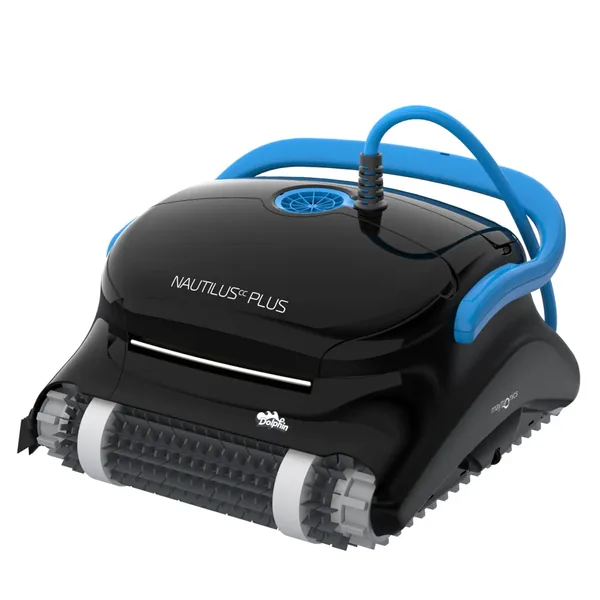
Dolphin Nautilus CC Plus
Weekly scheduler with 3-cycle options. Set it once and forget it. Dual scrubbing brushes, wall and waterline cleaning, fine filter. We've run ours 200+ times and it still performs like new.
Check Price on Amazon →What Your Run Frequency Signals About Pool Health
Here at PoolBot Labs, we've found that the frequency a robot needs to run to keep a pool clean tells you a lot about the overall health and balance of that pool. A pool that needs daily robot runs every week throughout the season without obvious debris sources (heavy tree cover, high bather load) is usually signaling a chemical balance issue rather than a cleaning load issue.
A well-balanced pool - chlorine 1.5 to 3.5 ppm, pH 7.4 to 7.6, CYA 30 to 50 ppm, alkalinity 80 to 120 ppm - generates far less biological load between cleaning cycles than a pool running on the low end of chlorine or with elevated phosphates. Phosphates above 100 ppb measurably increase algae growth rates, which translates to more frequent robot cycles needed to keep the pool floor clean. A $20 phosphate treatment from your pool supply store often does more for your robot's effectiveness (and your cleaning frequency) than buying a more powerful robot.
The practical diagnostic: if your robot basket is noticeably full after a 2.5-hour cycle every single time you run it, you likely have an imbalance generating biological load faster than average. If the basket is nearly empty after every cycle, you can reduce run frequency without any reduction in pool cleanliness. Let the filter basket tell you what the pool needs rather than running on a fixed schedule regardless of conditions.