How to Store a Robotic Pool Cleaner
My first pool robot lasted one winter in the garage before the housing cracked and the seals dried out. Replacing it cost $400. The correct storage method costs nothing and takes 15 minutes.
Clean the filter, drain all water, coil the cord loosely, and store indoors in a cool dry place - not in the pool shed, not on the garage floor, and never in direct sunlight. The cord and seals are the most vulnerable parts. Temperature swings and UV are what kill them.
Off-Season Storage: Step by Step
This is the full process I run every fall when closing my pool. It takes about 15 minutes and my robot has now lasted 5 seasons without a single seal or housing failure.
Do a full cycle the day before closing. This clears debris from the filter housing and prevents mold from forming inside over the winter months.
Pull the filter cartridge or bag out completely. Rinse with a garden hose until the water runs clear. Let it air dry fully - at least 2 hours - before reassembling. Storing with a damp filter grows mold that clogs the media permanently.
Tilt the robot in multiple directions to drain water from the motor housing and impeller chamber. Any water left inside can freeze and crack the housing if temperatures drop below 32°F.
Never wrap the cord tightly around the robot or in tight coils. Tight bending cracks the insulation over winter, which creates electrical hazards. Loop it like a garden hose - large, relaxed circles with at least 12 inches of diameter per loop.
A utility shelf in a basement, climate-controlled garage corner, or laundry room works perfectly. The goal is stable temperature above 40°F and no direct UV exposure. Many robots come with a storage caddy - use it.
Winter is a good time to order replacement brushes if they're worn. They're cheap ($20-40) and you want to start spring with fresh brushes rather than discovering worn ones the first week of swim season.
- Pool shed or outdoor storage box - temperature swings crack housing and seals
- Garage floor in freezing climates - concrete conducts cold directly into the body
- Direct sunlight - UV degrades rubber tracks and seals within one season
- Still damp - mold in the filter media and motor housing causes permanent damage
- Cord tightly wrapped - insulation cracks create shock hazards by spring
Between-Use Storage (48+ Hours)
During swim season, when the robot sits between cycles, most people just leave it next to the pool. That's fine for overnight, but for anything over 48 hours, move it to shade or indoors. A robot sitting in direct afternoon sun for two days loses months of seal life.
The minimum between-use routine: pull it out of the water when the cycle ends, rinse the filter, coil the cord, put it somewhere shaded. Takes 5 minutes. Extends robot life by years.
What Bad Storage Damages First
| Part | What Damages It | Replacement Cost |
|---|---|---|
| Power cord insulation | Tight coiling, freezing temps | $80-150 |
| Drive track seals | UV exposure, dry storage w/ chemical residue | $40-80 |
| Filter media/cartridge | Storing damp, mold growth | $20-50 |
| Housing/cover | Freeze-thaw cycles with water inside | $60-200+ |
| Brushes | UV, dry-hardening over winter | $20-40 |
Before storing for winter: filter clean and dry? Water drained? Cord in loose loops? Going indoors above 40°F? If yes to all four, you're done. That 30-second check is worth a few hundred dollars in repair costs.
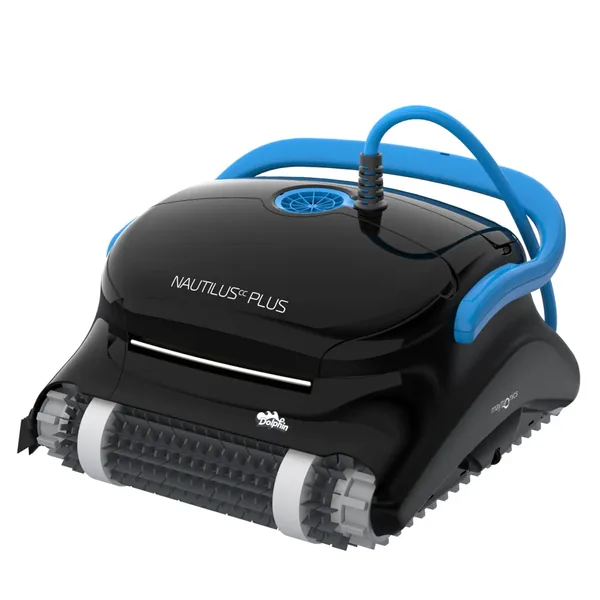
Dolphin Nautilus CC Plus
Built to last 7-10 years with proper storage. Comes with a storage caddy that makes off-season handling easy. We've had ours 4 seasons with zero failures.
Check Price on Amazon →The Power Supply Unit: The Part People Forget to Store Correctly
The robot gets all the attention at storage time, but the power supply unit (the external transformer box that plugs into your wall outlet and connects to the robot's cord) is just as vulnerable to damage - and far more expensive to replace when it fails.
Here at PoolBot Labs, we've seen more robot "deaths" caused by power supply damage than by damage to the robot itself. Dolphin power supply replacements run $150 to $250 depending on the model. Polaris units are similarly priced. These are electronics with capacitors and circuit boards - they don't tolerate freezing, moisture, or being stored on concrete floors where temperature fluctuations cause condensation buildup inside the case.
The right way to store the power supply: Wipe any moisture from the exterior. Coil the power cord loosely. Store indoors - the garage is acceptable if the temperature stays above freezing, but a climate-controlled closet or storage room is better. Never store it on a concrete floor directly; the moisture transfer from concrete causes corrosion on the circuit board over a full winter. A shelf, a plastic bin, or even a cardboard box with the robot is fine.
Checking the power supply in spring. Before the first run of the season, plug the power supply in and look for the indicator light (all major brands have one). Green or solid means healthy. No light, or flickering, is a signal to test with the robot before running a full cleaning cycle. If the robot doesn't respond at all and you've confirmed the cord connection is secure, the power supply unit is almost always the culprit - not the robot motor or electronics. A $200 supply replacement is far better than a $500 robot replacement.