Robot Pool Cleaner Not Working? Troubleshooting Guide
I dropped my robot in on a Monday and watched it spin in one spot for 20 minutes. I was convinced it had broken overnight. Turned out the brush had a hair wrap so tight it was jamming the drive motor. Five minutes with a pair of scissors and it was fine. Here's every common failure and how to diagnose it.
80% of robot failures are one of four things: clogged filter, tangled brush, cord knot restricting movement, or water level too low. Check these first before assuming anything is broken. Each takes under 5 minutes to diagnose and fix.
Symptom Diagnosis Table
| Symptom | Most Likely Cause | Fix |
|---|---|---|
| Robot won't move at all | Tangled brush or cord, no power | Check brush for wraps, check power supply, reset |
| Spinning in circles | One drive track stuck or jammed | Clean tracks, check for debris in drive wheels |
| Moves slowly, weak suction | Clogged filter | Remove and rinse filter cartridge fully |
| Won't climb walls | Low suction from dirty filter or worn brushes | Clean filter, check brush wear |
| Keeps getting stuck in corner | Navigation mode mismatch or tight pool geometry | Switch cleaning mode, shorten cycle time |
| Missing patches on floor | Worn brushes, cord restricting movement | Replace brushes, manage cord slack |
| Floats instead of sinking | Air trapped in filter housing | Submerge and tilt to expel air before running |
| Stops mid-cycle (corded) | Cord tangle pulling it back, overheating | Untangle cord, let cool 30 min, clean filter |
| Flashing error lights | Varies by model (see below) | Power cycle first, then consult pattern guide |
The Four Most Common Failures - Fixed
1. Clogged Filter
The most common cause of slow movement and weak suction. A fully clogged filter reduces suction by up to 70%. The robot still moves but leaves visible debris behind.
How to tell: Pull the filter out and hold it up to light. If you can't see light through the pleats, it's clogged. Rinse with a garden hose from inside out until water runs completely clear.
2. Tangled Brush or Drive Track
Hair, string, and pool toy debris wrap around brush axles and drive shafts. One good wrap can jam the motor completely or cause the robot to drag one side and spin in circles.
How to fix: Remove the robot from the pool and manually spin each brush by hand. If one doesn't spin freely, use scissors or a seam ripper to cut away wrapped material. Check the drive track wheels too - debris gets caught between the track and housing.
3. Cord Tangle (Corded Robots)
A tangled cord restricts the robot's movement range and creates enough resistance to stop it mid-cycle. It's also the leading cause of missed floor patches - the robot can only reach so far before the cord pulls it back.
Prevention: Always lower the robot straight down from the edge of the pool. Never toss it in. The initial entry angle determines how the cord runs during the cycle. Some robots have swivel connectors at the cord-robot junction specifically to prevent twisting - make sure yours is free to rotate.
4. Robot Stuck in the Same Corner
Some pool shapes - particularly pools with tight right-angle corners, steps that protrude, or irregular features - create geometry traps. The robot navigates into the corner and can't reverse out cleanly.
Fixes to try: Switch to a shorter cycle time (90 min vs 3 hours). Some robots have a "floor only" mode that avoids wall transitions where corners become traps. For persistently troubled areas, a pool noodle placed in the corner at an angle creates a slope the robot can climb out of.
Flashing Error Lights: What They Mean
Error code patterns vary by brand and model, but most follow a similar logic. Your manual has the specific pattern key, but here's what we've seen most frequently across Dolphin, AIPER, and Polaris robots:
Usually indicates motor overload or overheating. Pull robot out, let it cool 30 minutes, clean the filter, try again.
Often a drive motor blockage. Check both drive tracks for debris. On corded robots, also check the power supply unit.
Communication error between unit and power supply. Disconnect completely, wait 60 seconds, reconnect and restart.
Power supply issue. Check the outlet, GFCI reset, and the power supply box itself. The PSU on corded robots is the #1 hardware failure point.
If you shocked your pool in the last 24 hours and the robot is behaving erratically, that may be the cause. High chlorine from shock (above 5 ppm) can trigger safety shutoffs on some robots and accelerates seal degradation. Wait until chlorine drops to normal 1-3 ppm range before running.
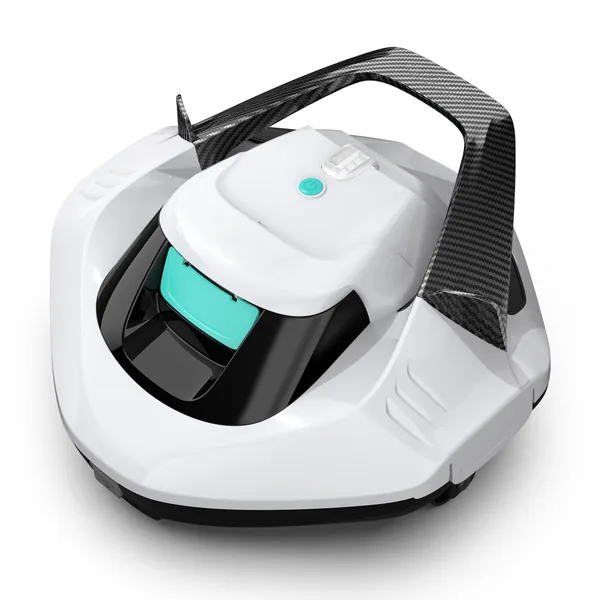
AIPER Seagull SE
Cordless design eliminates the cord tangle problem entirely. Simple filter access, no power supply box to fail. When it misbehaves, it's almost always the filter. One of the easiest robots to diagnose and maintain.
Check Price on Amazon →